System study & flowcharts
Mapped asset registration, location tagging, ownership, movement, service, depreciation, and disposal into one lifecycle before screens were built.
I was a major developer on this asset management system at Petro Infotech. It digitizes the full lifecycle of office assets — furniture, hardware, software, and network accessories — with a web application and an Android tracker for registration, movement, ownership, depreciation, and warranty.
Recruiters should read this first: I was not a peripheral contributor. I worked across system study, software design, database architecture, web UI, barcode tagging, and the Android asset tracker for this Petro Infotech product.
Mapped asset registration, location tagging, ownership, movement, service, depreciation, and disposal into one lifecycle before screens were built.
Shaped the web application and Android tracker so a tagged asset could move from register to scan, transfer, warranty check, and retirement without leaving the suite.
Designed SQL Server structures for asset masters, locations, hierarchies, ownership history, consumables, depreciation, and service records.
Built asset register screens, barcode/QR label flows, and tracker views with ASP.NET, HTML, CSS, and JavaScript for office and field use.
The product ships as two applications: a web system for lifecycle control and an Android smart-device app for QR scanning, optional GPS, movement, and stock checks. This is the role to remember: a major developer who could design the asset workflow, build both surfaces, and keep register, tracker, and financial details in sync.
Offices need one place to register furniture, hardware, software, and network accessories, then prove where each item is, who owns it, what it is worth, and when warranty or disposal is due.
Asset details lived in spreadsheets, paper registers, and disconnected store files. That made ownership unclear, movements hard to prove, warranties easy to miss, and depreciation almost impossible to trust.
The product is a web application plus an Android smart-device tracker for registering assets, printing barcode/QR labels, scanning QR codes to identify items, capturing GPS when a live location is required, tracking movements and ownership, and managing hierarchy, consumables, depreciation, service, and disposal.
The goal is control, then auditability: tag every asset, follow it as it moves, keep warranty and value current, and close the lifecycle with a recorded disposal instead of a missing item.
Capture category, serial, location, photos, and hierarchy for furniture, hardware, software, and accessories.
Generate barcode or QR labels for assets and locations so the tracker can identify them by scan. Capture GPS only when a live position is required.
Record ownership, department, and hierarchy so custody is always visible on the web and on the device.
Track transfers between people, rooms, and sites with a scan instead of a paper movement slip.
Keep warranty, service, and consumable history attached to the same asset record.
Run depreciation, then dispose or write off with a closed lifecycle instead of a missing item.
Two live screens from the Android app: scan a QR label to identify the asset, then open details with GPS location when a live position is required.
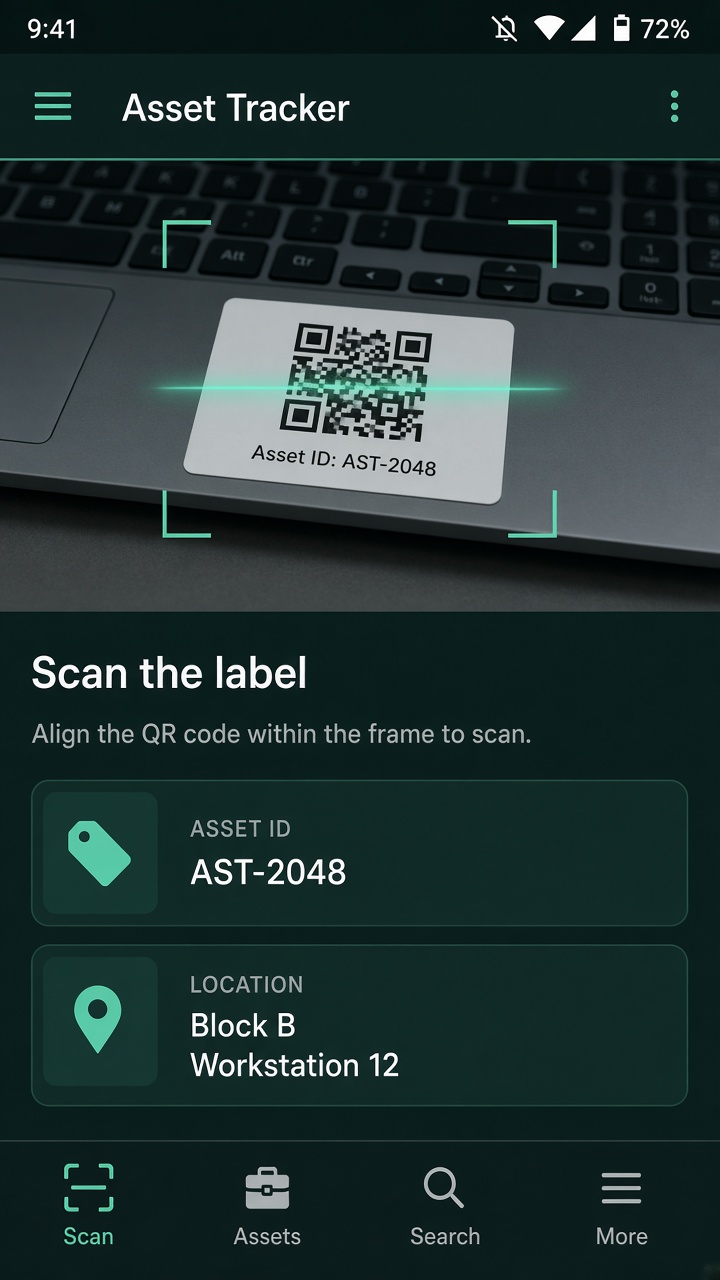
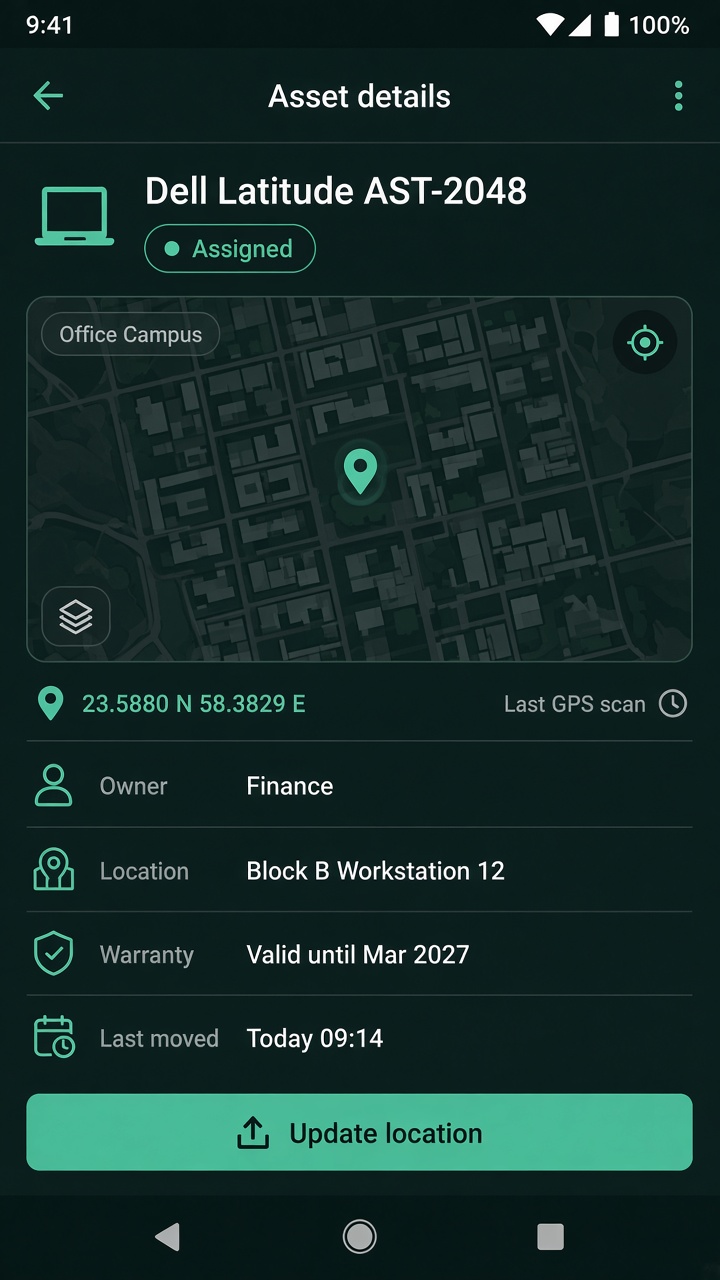
A focused asset-management suite for office operations — registering items, tagging them with barcode or QR, scanning to identify an asset, optionally capturing GPS when a live location is required, and keeping depreciation, warranty, and disposal in one place.
Authorized staff capture furniture, hardware, software, and network accessories with serials, photos, locations, and hierarchy in a single asset master.
The Android tracker identifies assets by QR or barcode scan, follows movements and stock checks, and can capture GPS location when a live position is required.
Warranty, service, consumables, depreciation, and disposal stay attached to the same record until the asset is retired.
This is an intelligent asset management solution that streamlines the complete lifecycle of office assets — furniture, hardware, software, and network accessories — through a web application and a flexible Android smart-device app.
It tracks movements, ownership, hierarchies, depreciation, and warranty details. QR codes and barcode labels identify assets and locations on scan. GPS location can be recorded from the tracker when a live position is required — for example off-site or roaming equipment — without forcing coordinates on every office item.
The suite digitalizes registration, consumables, service, and disposal so store, admin, and finance teams share one register instead of disconnected files.
Capture category, serial, location, photos, and hierarchy for furniture, hardware, software, and network accessories.
Generate labels for assets and locations so a reader or the Android app can identify an item on the spot.
Identify an asset instantly by scanning its QR code from the Android tracker or a reader — no serial number typing, no guesswork on the floor.
Capture GPS coordinates on the tracker when a live location is required. Stationary office assets can stay on room and floor codes; roaming or off-site items can report where they were last scanned.
Android smart-device app for QR/barcode scanning, optional GPS, movement, stock checks, and on-the-go updates without a dedicated scanner.
Record transfers between people, rooms, and sites against the same tagged asset instead of a paper slip.
Keep custody, department, and parent-child asset structure visible so reporting matches the real office layout.
Track value over time from the register so finance can see book value without a separate spreadsheet.
Store warranty windows and expiry alerts so service is booked before cover lapses.
Log maintenance, then retire or dispose of the asset with a closed record instead of a missing item.
Manage consumable stock alongside tagged fixed assets so store control stays in the same suite.
Single source for furniture, hardware, software, and network accessories so every tagged item has one reliable home.
Authorized staff can register assets from the web application and keep serial, location, photos, and hierarchy attached as the item moves through its lifecycle.
The system was developed with C#, ASP.NET 4.0, ADO.NET, SQL Server, HTML, CSS, and JavaScript, plus an Android smart-device application for barcode and QR scanning. This is the stack I used on the product.
Core web application, asset lifecycle rules, and data access from registration through disposal.
Database architecture for asset masters, locations, ownership history, depreciation, warranty, and service records.
Smart-device app for barcode and QR scanning, movement updates, and stock checks in the office or store.
Six areas cover the full loop: register the asset, tag it, track it on Android, follow ownership and movement, then depreciate, service, and dispose.
This is the heart of the product. Authorized users log furniture, hardware, software, and network accessories, attach photos, and keep the item as the single source of truth.
Field and store teams scan a QR code on a smart device to identify the asset, confirm location, update movement, and optionally capture GPS when a live position is required.
Every registered asset and location can receive a unique QR or barcode label. Scanning that code identifies the asset in the register — no serial number typing on the floor.
Transfers between people, rooms, and sites stay on the asset history so custody and hierarchy never depend on a paper slip.
Book value stays attached to the register so finance can see what an asset is worth without a second spreadsheet.
Warranty windows, service visits, consumables, and final disposal close the lifecycle so nothing is written off without a record.